Orders right on the chart
Click to buy or sell from the chart itself, without opening the ChartTrader menu.
Place orders directly on your NinjaTrader 8 chart. Order Panel is an alternative way to place orders from the chart, so you can stay focused on the current price action.
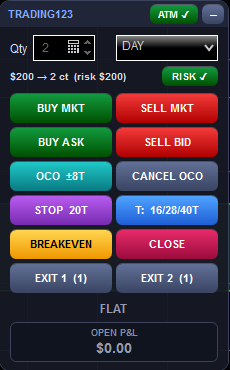
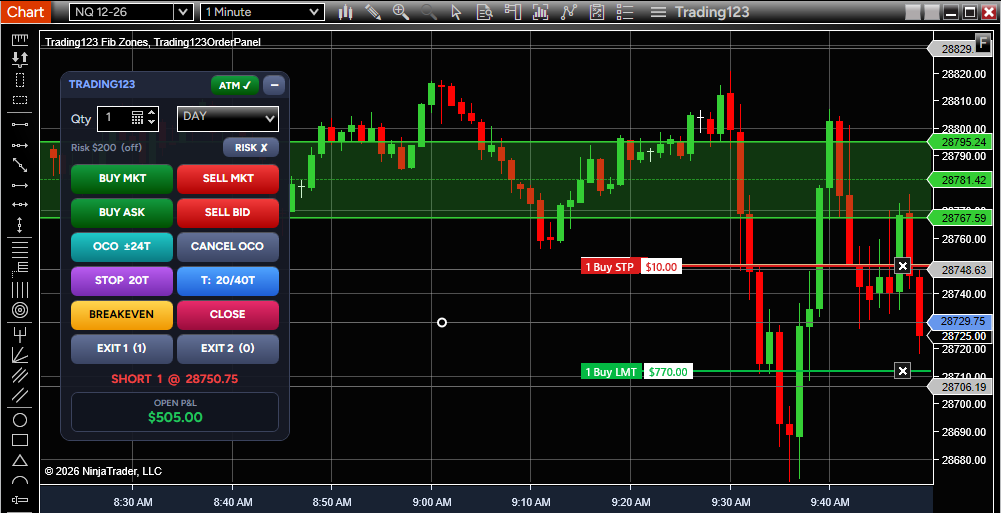
Order Panel puts your order entry, stop and target control, break-even and exit buttons right on the chart.
Click to buy or sell from the chart itself, without opening the ChartTrader menu.
Buy Market, Sell Market, Buy Ask and Sell Bid buttons put your order in with one click.
Use one-cancels-other orders so that when one side of your order fills, the other is cancelled for you.
Control your stop and your profit target from the same panel, without leaving the chart.
Move your stop to break-even with a single button when the trade is moving your way.
Close everything with Close All, or use the separate Exit 1 and Exit 2 buttons.
Beyond placing orders, Order Panel handles brackets, targets, sizing and exits, with settings you can change in the indicator properties.
Attach a stop and profit target bracket automatically when an entry from the panel fills. It stays in sync as you scale in or exit part of the position.
Split your position across one to three targets. Set each target in ticks, or use risk to reward ratios off your stop distance.
Enter the dollars you want to risk. The panel works out the contracts from your stop distance and tick value, rounds down, and caps the size at a maximum you set.
Place a buy stop above the ask and a sell stop below the bid, with the distance set in ticks. The first to fill cancels the other, and the bracket attaches. Cancel OCO clears it.
When Target 1 fills, the remaining stop moves to your entry plus an optional tick offset. The stop moves only in your favor.
Let Exit 1 and Exit 2 split your live position in half, or set fixed quantities for each button.
Drag your entry, stop and target lines on the chart to change them. Stop and limit order lines show the dollar profit or loss at that price, and the X on a line exits or cancels it.
Drag the panel anywhere on your chart, collapse it when you need the room, and see your open P&L at a glance. Choose DAY or GTC for your entries.
Scale-in is off by default, so pressing the same side again does not double up by accident. Turn it on and each press adds your quantity.
Order Panel places real orders on the account you have connected when you click its buttons, and you are responsible for every order. Practice on a SIM account first. Trading futures involves substantial risk of loss.
A single payment unlocks Order Panel, with free updates, the manual and a setup video included.
No monthly or yearly fees.
Instant download · Secure checkout
All sales final · Refund policy
Order Panel is an indicator for NinjaTrader 8 that lets you place and manage orders directly on the chart, without the ChartTrader menu. It supports OCO orders, stop and profit target control, a break-even button and close buttons.
The panel includes Buy Market, Sell Market, Buy Ask and Sell Bid orders, with OCO orders and control of your stop and profit target. You can use the break-even button, close everything with Close All, or use the separate Exit 1 and Exit 2 buttons.
Yes. Order Panel works on both SIM and live accounts in NinjaTrader 8. We recommend practicing in SIM first until you are comfortable with how the buttons behave.
It is compatible with NinjaTrader 8 accounts, including prop firm accounts that support NinjaTrader 8. Prop firm rules differ, so confirm your firm's rules on order tools before you use it.
It can. Order Panel runs on NinjaTrader 8, so it works with brokers and data feeds that connect to NinjaTrader 8. You will need NinjaTrader 8 installed and a connected account, SIM or live.
Order Panel works with the most current version of NinjaTrader 8.
No. It gives you another way to place and manage orders from the chart itself, so you do not have to use the ChartTrader menu to place orders. ChartTrader stays available in NinjaTrader 8.
Order Panel is a digital download, so all sales are final and there are no refunds or exchanges. Practice on a SIM account first, and read the full refund policy before you buy.